
If you currently use or used the eBay Merchant Integration Platform (MIP) or a 3rd party that uses eBay's Inventory API to create your listings, Marketplace Management will not be able to update those listings. Price and quantity updates will result in an error. Marketplace Management leverages eBay's more widely adopted Trading API and the eBay systems are incompatible.
You will get an error from Marketplace Management that looks similar to this on the Listings Workspace and SKU pane:
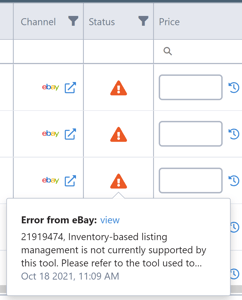

In order for Marketplace Management to successfully update these listings and manage your prices and inventory for these listings, follow the instructions below.
Delete the listings from eBay and republish the listings using Marketplace Management
If you have a small subset of listings impacted by this incompatibility, you may delete those listings and republish the listings using Marketplace Management.
Here are the suggested steps:
- The items should already exist under the Products Workspace and Listings Workspace in Marketplace Management. Find the listings in Marketplace Management and add any missing information which did not import into Marketplace Management for the eBay listings.
- Ensure you have downloaded and saved all relevant product information from eBay.
- Delete the listings from eBay.
- Ensure the correct categories are selected.
- If you have the products listed on multiple marketplaces, reach out to support@selleractive.com to request the eBay item IDs be cleared from Marketplace Management and provide the exact list of SKUs. Please await confirmation before proceeding to the next step. You may proceed to the next step if the item was only listed on eBay and you are comfortable removing the listings from our system to start over.
- Publish the listings. (If this is your first time publishing listings to eBay from Marketplace Management, ensure the appropriate settings are enabled to allow Cart Multichannel Management to publish to eBay by first going to Settings > Integrations > eBay)
- Check for any errors and resolve them before republishing again. If you receive an error you do not know how to resolve, please email support@selleractive.com with the SKUs and errors received.
- We recommend creating new listings directly on eBay or using Marketplace Management to publish new listings in order for Marketplace Management to update your listings' prices and quantities as expected.